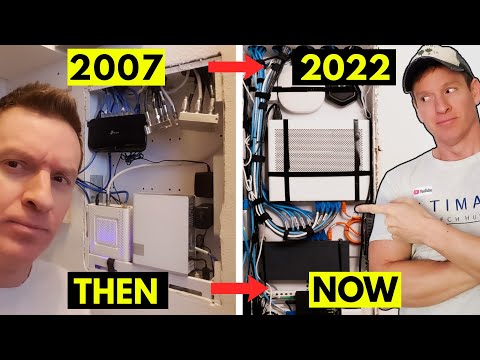
this is the battle of the home
networking panels introducing in the
right corner built in 2007 that little
panel that could and terribly undersized
and not much to look at and in the left
corner debuting it 2019 the heavyweight
champion bringing sexy back and faster
than one gig speeds
what's up guys welcome back to the
channel thank you for joining me you
guys are awesome so today is a
retrospective look at a home networking
panel from our previous home we bought
back in 2007 and i want to compare and
contrast that networking panel with our
latest and greatest networking panel
that we have today
all right guys this battle of home
network panels is going to be a five
round match first round is size
second round's location
third round is power outlets fourth
round is amount of devices in the panel
and last round is panel door and
ventilation hey apollo can you ring the
bell
there are many differences between these
two network panels and obviously size is
one of them and believe it or not the
smaller panel was in a larger home a
much larger home alright guys the new
panel is a very large panel in size
it's got 10 feet of led strips around it
that gives you an idea of how big this
panel is also panel depth is way deeper
than the other panel i would say almost
twice as deep which in turn lets you
install thicker devices alright so we
know this panel is much larger than the
older panel but does a smaller panel
have any advantages well yes there are
some advantages to a smaller panel first
a smaller panel fits in smaller spaces
like for this wall here it would fit
right here larger panel would not number
two a smaller panel is easier to manage
because there's less devices and the
third advantage to a smaller panel is
simplicity so if you're tight on space
and all you have is a modem and a router
and maybe a switch
then a small panel will work for you
however there is zero room for growth
and i vote for the bigger panel because
we know bigger is better and to be
honest to put this small of a panel in a
two-story home with five bedrooms is
kind of ridiculous so round one size
goes to the new panel
round two location
now both of these panels were installed
in bedroom closets our newer panel was
installed in the master bedroom closet
well i do believe there could have been
a better location like the laundry room
or pantry this location is pretty good
our wi-fi coverage is great throughout
the house however the old home the 2007
home
that panel had a terrible location this
panel was stuck in a small closet
upstairs towards the back of the house
and with our wireless router installed
in that closet to get wi-fi signal
downstairs was almost impossible and
spotty at best once again that panel
location should have been in the center
of the home and to be honest that panel
location sucks so round two location
goes to the new panel alright round
three let's talk about power outlets the
old panel in 2007 had one power outlet
to plug in two devices and once again
for a home this size you're gonna have
more than two devices in that panel so
for me that's an obvious failure by the
builder not to install additional power
outlet there should be four power
outlets in that panel minimum all right
guys as far as the power outlets for
this panel
we have four outlets
for four devices
which is not nearly enough as you can
see we have one power outlet here
as well as a backup power supply here
both panels fail when it comes to power
outlets so round three is a draw all
right guys round four in this round
we're going to compare how many devices
can go into each box obviously the panel
from 2007 cannot hold as many devices as
the newer box
as you can see our newer network panel
has lots of devices
okay with this new panel you can see the
amount of devices we have here you count
one two three four
five six
seven
and we'll go eight
nine devices
also has the power bricks here as well
as led lighting
way more than the old panel
so round four definitely goes to the
newer network panel and even though we
know the newer network panel has already
won the battle
round five is a panel cover our newer
network panel has a panel cover that's
hinged however the older network panel
does not the cover for this panel is
screwed on with four screws and while
that makes it very secure and hard to
open and get to that kind of is the
point it's kind of hard to get to so if
you're going to be going in and out of
that panel a lot unscrewing four screws
every time is a big pain also that panel
door has no ventilation and by leaving
that panel door on
the devices inside that panel will get
hot and overheat all right guys as you
can see here we do have a door
open to closes
also has ventilation here as well this
ventilation lets all the heat out when
it gets hot
but to be honest i leave this door open
most of the times because it gets very
hot in here but round five does go to
the new panel so the clear winner is the
new panel and one thing i want to advise
anybody who's building a home or buying
a home make sure your network panel is
large enough for all your devices
especially in a two-story home you need
a large panel even though the older home
only had seven cat5e cables going into
that panel but there was a lot of coax
going in that panel and all those wires
and cables made the panel even smaller
especially when you want to add devices
if you look at this video you can see we
have a wifi router on a shelf there is
absolutely no room in the panel and
that's a shame because the house that
size should have a massive network panel
but once again learn from those builders
mistakes
and make sure you install a large
network panel and if you have a small
network panel in your home i would
encourage you to remove that panel and
install a larger one and make sure that
panel is in the central location of your
house
but guys once again everyone thank you
so much for watching and guys if you
like this kind of content make sure to
give a thumbs up and share it and hit
subscribe to keep this channel alive
thanks for watching and i'll see you in
the next video real soon
peace
you