
If you're experiencing network connection problems or want to map out your home's Ethernet ports, a network cable tester is an essential tool. This guide covers how these testers work, why they’re useful, and compares two popular models: the Pro Scout 2 and Pro Scout 3.
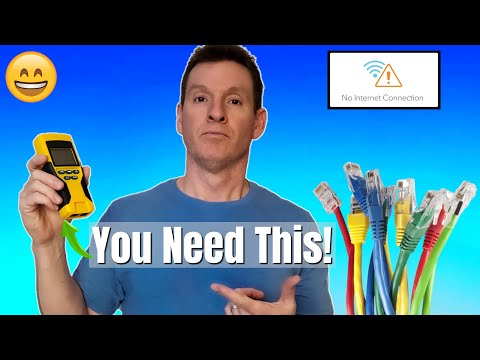
A network cable tester is a tool used to check the health and connectivity of Ethernet cables (RJ45), phone lines (RJ11), and coaxial cables. For this guide, we focus on Ethernet cables, particularly Cat5e and Cat6.
These testers help determine whether a cable is faulty, incorrectly wired, or properly terminated — making them valuable for both home users and professional technicians.
The VDV Scout Pro 2 is a versatile tester supporting:
For our example, we only focus on Ethernet. To test a cable:
The Scout Pro 2 includes numbered remote terminators. You can plug these into all your home’s data ports, then identify each wire at the network panel using the main tester unit. This allows you to fully map your home’s Ethernet network.
| Feature | Pro Scout 2 | Pro Scout 3 |
|---|---|---|
| Backlit Display | No | Yes |
| Cable Length Measurement | No | Yes |
| Locates Cable Faults (in Feet) | No | Yes |
| Price (Approx.) | $99 | $125 |
If you need basic connectivity checks and port mapping, the Pro Scout 2 offers great value at around $99. However, if you want advanced diagnostics like cable length measurement and pinpointing break locations, the Pro Scout 3 is worth the additional cost at $125.
For those on a tighter budget, there are cable testers available for around $50. While they lack advanced features, they still provide basic wire mapping and continuity testing.
A reliable network cable tester is a must-have tool for diagnosing home network issues, verifying cable terminations, and mapping your network. Whether you’re a homeowner, DIY enthusiast, or professional installer, tools like the Pro Scout 2 or Pro Scout 3 make troubleshooting faster and more efficient.
are you having trouble connecting to the internet does your computer say no internet connection are all or some of your devices offline maybe your iot devices or your gaming console or one of your tvs well if you answered yes to any of these questions you might need a [Music] what's up guys welcome back to the channel i'm mike this is the ultimate tech hub thank you for joining me i really appreciate it you guys are awesome so if you've ever had any issues with your network going down or maybe a computer not getting an internet connection then you may need one of these this is a network cable tester and today i'm going to talk about why you may need one of these and how they work and at the end of the video i'll recommend a few of these that fit different budgets so first what is a network cable tester a network cable tester is a device used to test voice data and video and there are a multitude of these kinds of devices even including fiber testing but today's focus is going to be on your network cables rj45 connectors cat5e or cat6 and for today's example we're going to be using the scout pro this is the vdv scout pro 2. and vdv stands for voice data and video and this particular cable tester has three different inputs an rj11 connection a coax connection and rj45 we're not going to focus on the rj11 because our house has no phone lines and we're not going to focus on coax either because once again we have no coax we'll take that back we do have coax but we don't use it and if you've watched my channel you've seen my video why i ditch cable for fiber so we have no coax to test but today we're focusing on the rj45 connections so going back to my original question have you had an issue with no internet connection one of the best ways to solve this problem is to determine if a cable is bad or connection is bad and the network cable tester is a great way to find bad connections all right let me explain how this works for an example we're going to test this cable line you simply plug in one end of the cable into the tester pull this one out and plug it into the other end we'll turn this on and we'll hit test you can see all the numbers here they all correlate to the wires inside the cable because ethernet cables have eight wires and these five ethernet plugs and five coax plugs can be used to map an unknown network meaning you don't know where the wires go so if you have five different data ports in your house plug all five connectors in and take note of each number for each room then go to your network panel and connect the proscot 2 to one of the wires it will then give you a number which maps the location then rinse and repeat until you've mapped your entire home network you can do the same with the coax as well so if you believe that your internet connection is bad from a faulty wire this is a valuable tool to find that out and the proscot 2 is around 99 my recommendation though is to get the pro scout 3 which is about 125 dollars and the reason why i recommend this is it's a little bit bigger it has a backlight also the pro scout 3 will test length of cable if you plug this in here and you plug it in here you turn it on and test it it will tell you how many feet this is pretty cool also if the cable is bad it will tell you the location within the cable how many feet so if there's a break in the cable three feet in it will tell you three feet pretty cool but if you're on a budget the proscat2 is great for 99 bucks but for my recommendation the pro scout 3 is the top choice and just a heads up the battery life on these are incredible right now i'm the low battery but this battery has been in here for about three years not bad like i said before this is a valuable tool that tests for voice data and video it's got fantastic battery life it's very portable not too big and can make your life much easier if you're a network cable technician i can't count how many times i've terminated rj45 connection and i thought it was good but i plug it in here and it was bad so guys i recommend the proscot 3 or the pro scout 2. and of course there'll be a link in the description below to where you can buy these i'll also have a link to some cheaper cable testers probably around the 50 range so if you're on a tight budget then those will do but if you have some money to spend get the proscot 3 you won't be sorry well guys if you made it this far thank you for watching i really appreciate it you guys are awesome and guys if you like this video and you found it helpful please give a thumbs up and share it and of course hit subscribe it's free and i'll see you next video real soon peace
HDMI over Ethernet is a useful technology for extending HDMI signals over long distances using Ethernet cables. By compressing ...

On today\'s episode we fully explain the differences between public and private IP Addresses. We also explain DHCP and why ...
Welcome back to The Ultimate Tech Hub. On today\'s episode we are going to show you "How To Wire Drop 2 Cat6 Cables" using ...

Welcome back to The Ultimate Tech Hub. On today\'s episode we show you how to install RGB Smart Lights to a Residential ...

Welcome back to The Ultimate Tech Hub. On today\'s episode we will run an Cat6 Ethernet cable through the wall. Then we will ...

The TP-Link Archer Ge800 is a Tri-Band BE19000 Wi-Fi 7 Gaming Router. In this video we will speed test the Archer GE800 both ...