hi everyone and welcome back
on today's video we're going to review a
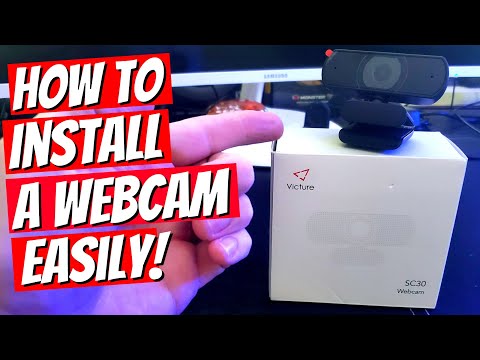
webcam
from victor i'm mike and this is the
ultimate tech hub this webcam from
victor
is the sc30 model this model is full hd
which means 1080p this webcam has an 80
degree
field of view and comes with auto light
correction
the lens type is a hybrid lens and the
video encodings
h.260 and this model comes with double
noise canceling mics
and the connection interface is usb 2.0
and the system requirements are windows
xp or above
mac os 10.6 or above chrome os
and android 5.0 and above this webcam
works with skype
zoom google hangouts and facetime for
mac
this webcam has the ability to connect
to a monitor with this clip
you can also place it on a flat surface
if you want or you can connect this to a
tripod
via the screw hole under the clip we're
going to connect this webcam to our
monitor
and the mounting clip is adjustable for
many different shapes and sizes of
monitors
and you have the ability to rotate this
webcam a full
360 degrees left to right or right to
left
and this webcam also moves up and down
so we'll connect the usb from the camera
to the usb on our desktop
once our computer recognizes and detects
our device
we can then launch an application to
test the webcam
we'll be using skype to test this webcam
[Music]
okay guys this is the video and audio
test
for the sc30 we're on a skype call
it's not really a skype call it's a test
call but i want to show you the video
quality
is 1080p full hd now
most webcams on the market are this
typical 1080p
so it's not much different to me it
looks the same it looks great
the autofocus is great everything just
there's no blurring
looks really good let's talk about the
audio
the audio on this is two speakers up top
which makes it different because
many of the webcams on the market have
one speaker
so this has two also the webcam we
bought about four months ago
it was 40 bucks and you only had the one
microphone this has got two microphones
and the price for this is 29.99
so you really can't go wrong it's got a
good functionality
moves around easy left to right up and
down
also the bottom of the microphone stand
can connect
to a tripod which is really nice so guys
if you're looking for a really
good webcam this could be the one for
you
and guys remember to visit my patreon
page where two dollars a month
helps keep this channel going and for
every new member that joins you'll get a
personal shout out from me
on the very next video so guys remember
if you like these videos give a thumbs
up and share it
if you love them hit subscribe keep this
channel alive
thanks again for watching
you