
In this tutorial, we upgrade a home network panel by replacing an unmanaged TP-Link switch with a Layer 2 PoE managed switch from EnGenius. Learn how to install the switch, organize your cables, and gain powerful network management tools like VLANs and PoE scheduling—all at an affordable price.
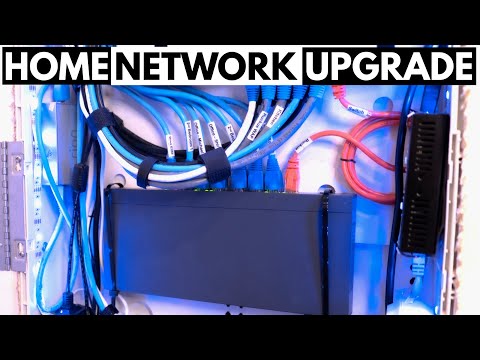
After reviewing the limitations of an unmanaged switch, this video walks through the complete upgrade to an EnGenius Layer 2 PoE switch.
In addition to hardware setup, the video touches on the EnGenius Cloud platform. While a deeper VLAN setup guide is coming in a future video, this serves as an excellent introduction to the benefits of a managed switch.
With a cost under $150, this upgrade offers immense value and prepares your network for future expansion or Layer 3 management features.
It was time to upgrade our home network panel. After weighing the costs and benefits, we decided to make the move.
Our current setup included a TP-Link 8-port unmanaged switch. While it worked, it didn’t offer the traffic control or security that we needed. To gain more network control, we upgraded to a Layer 2 PoE managed switch from EnGenius.
This switch allows VLAN creation, traffic monitoring, PoE scheduling, and more. It's a great way to learn network management before moving on to a Layer 3 switch.
The plan was to remove the TP-Link switch, relocate the fiber modem, and mount the new EnGenius switch in its place. We secured it using zip ties and pre-drilled holes inside the panel. While velcro was an option, the zip ties offered a more stable fit.
We mounted the switch carefully, keeping it low in the panel to hide cabling and maintain a clean layout. We also secured the modem to a bracket using more zip ties, ensuring nothing moved or cluttered the panel.
One tip—label all Ethernet cables. This makes VLAN setup and troubleshooting much easier. Knowing where each port connects saves you from guesswork when configuring the switch.
Once the hardware was installed, we powered it up and prepared to manage it through the EnGenius Cloud interface. This platform allows full control of port settings, VLANs, and more.
We'll be releasing a separate video to cover all the EnGenius Cloud management options in detail. In the meantime, this video provides a solid overview of the hardware install and core upgrade benefits.
If you're using an unmanaged switch, we highly recommend upgrading to a managed PoE model. It's a smart investment for better performance, reliability, and learning opportunities—and it's available for under $150.
If you enjoyed this video, give it a thumbs up and share it. Subscribe if you haven’t already. Thanks again, and we’ll see you in the next video!

On this episode of The Ultimate Tech Hub, we will replace an existing light switch with a new Caseta Smart Switch from Lutron.

This Video is Sponsored By www.elvishredlight.com High-Quality Red Light Therapy Panels at the Lowest Prices!
This is the Slate 7 Wi-Fi 7 Router from GL-iNet, the World\'s Fastest Mobile Wireless Router! If you need a fast, secure and portable ...

Ready to build the perfect home network in 2025? In this step-by-step guide (2025), I\'ll show you exactly how to Build a Home ...

Welcome back to Ultimate Tech Hub. On this episode of Ultimate Un-Boxing we will take a look at the Legrand ON-Q Universal ...

Cat 8 or Fiber for your Home or Business Network? Best Deals On Cat 8 and Fiber Cables: Cat 8 Ethernet Cable 50 ft,1.5ft 6ft 10ft ...